
Our WordPress hostings do not have an email function and therefore you cannot use your own email addresses on the hosting. This is stated in the product description.
We have two solutions for you here. On the one hand, you can order the Hosted Exchange product or order web hosting. If you opt for web hosting, the smallest subscription is sufficient for e-mails. This can be extended at any time if necessary.
Variante Hosted Exchange
Only the DNS records for Hosted Exchange are required here. You can read here what these are and how to enter them.
Variante zusätzliches Hosting
If you have one of the web hostings in addition to WordPress hosting, proceed as follows.
Here you have to set an additional A-Record for Webmail (if you want to use this) and adjust the MX Record.
A Record für Webmail
Host: webmail.yourdomain.eu
Account selection for IP: select the other hosting or enter the IP manually.
MX Record auf “normales” Hosting
Host: deinedomain.eu
Mail Exchanger: Server name
You can find the server name in your myhosttech customer center > Server center > Server center > Select the web hosting > Server name.
Installation Domain und Erstellung Postfächer
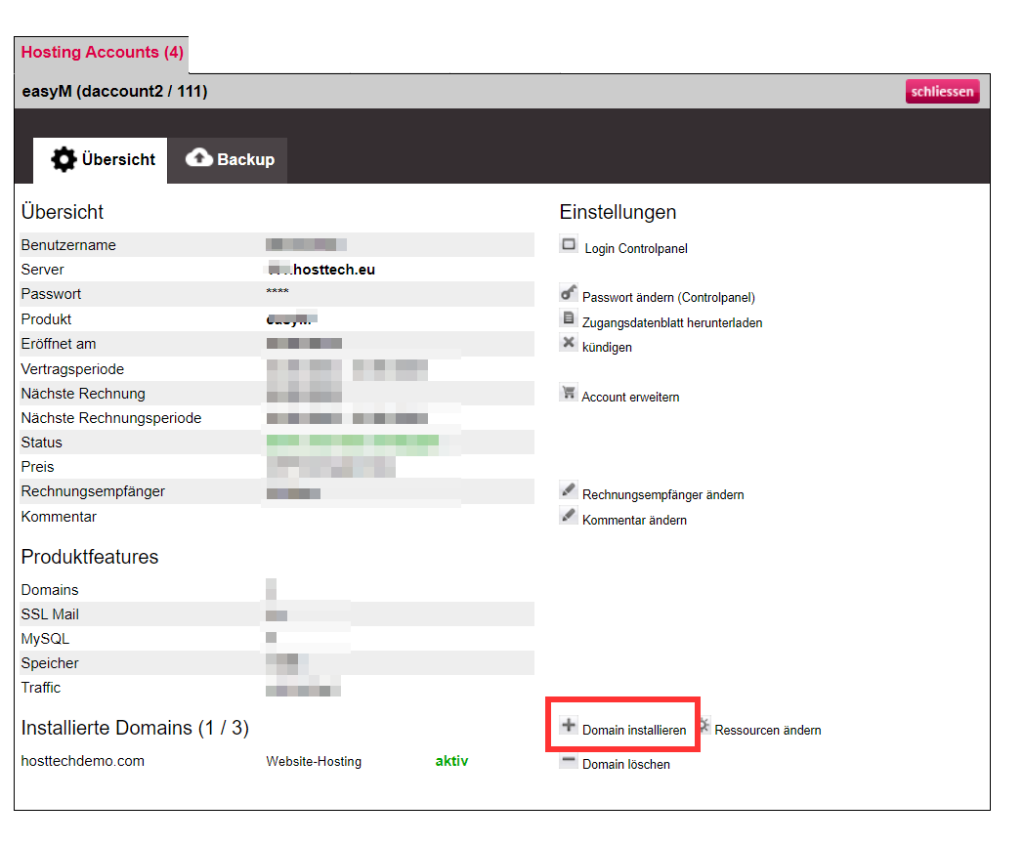
Now you can install the domain in your web hosting and create the e-mail addresses.
To do this, go to Servercenter > Servercenter in your myhosttech customer center and select your web hosting. Here you can then click on “Install domain” and install it as website hosting.
You can read how to create e-mail inboxes here .